![iAM Learning logo-1.png]](https://support.iamlearningcontent.com/hs-fs/hubfs/iAM%20Learning%20logo-1.png?height=50&name=iAM%20Learning%20logo-1.png)
In Training Manager, open your account menu and click Email Settings. Scroll to the "Learners enrolled after" section.
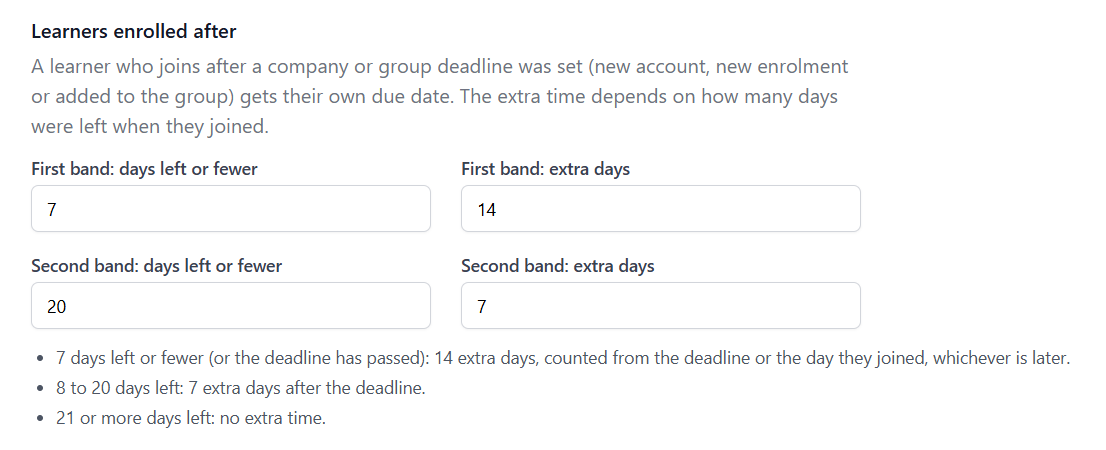
There are two bands, each with two numbers:
- First band: days left or fewer. If a learner joins with this many days left, or after the deadline has passed, they get the first band's extra days. The extra days are counted from the deadline, or from the day they joined if that is later.
- Second band: days left or fewer. If a learner joins with more days left than the first band but no more than this, they get the second band's extra days after the deadline.
Learners who join with more days left than the second band get no extra time.
As you type, a summary under the boxes shows the rule in plain words, so you can check it before you save. Click the green "save" button at the top of the Notifications section when you're happy.
The standard settings are 7 days with 14 extra days for the first band, and 20 days with 7 extra days for the second.
Please note, each number must be a whole number from 0 to 365, and the first band's days must be fewer than the second band's. The new numbers apply to every company and group deadline, including ones already set, the next time a due date is worked out.
If you don't see Email Settings, deadlines may not be turned on for your company. Contact us and we can check it for you.
Article Last updated: 26/11/26