![iAM Learning logo-1.png]](https://support.iamlearningcontent.com/hs-fs/hubfs/iAM%20Learning%20logo-1.png?height=50&name=iAM%20Learning%20logo-1.png)
This article is for Training Managers, Champions and Group Admins with edit access.
If an administrator needs to complete the training for the group they are managing, they need to be a member of the group as well.
It is possible for a user to be both an admin and a member of the same group.
They can be an admin of a group and a member of a different group if they need access to different courses.
To find out which groups a user has access to as a member, simply go to their profile and select "groups". You will see a list that shows the groups they are part of.
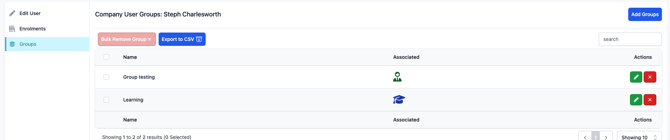
The blue hat icon means that the user is a member of that group.
A green person icon means that the user is an admin of that group.
To add users to groups, simply click on "add group" located in the top right-hand corner.
Please keep in mind that admins cannot add or remove themselves as members from groups. This task must be completed by a training manager or champion.